Brdsnest Lemmy
  • Communities
  • Create Post
  • Create Community
  • heart
    Support Lemmy
  • search
    Search
  • Login
  • Sign Up
FoxtrotDeltaTango@sh.itjust.works to Programmer Humor@programming.dev · 3 days ago

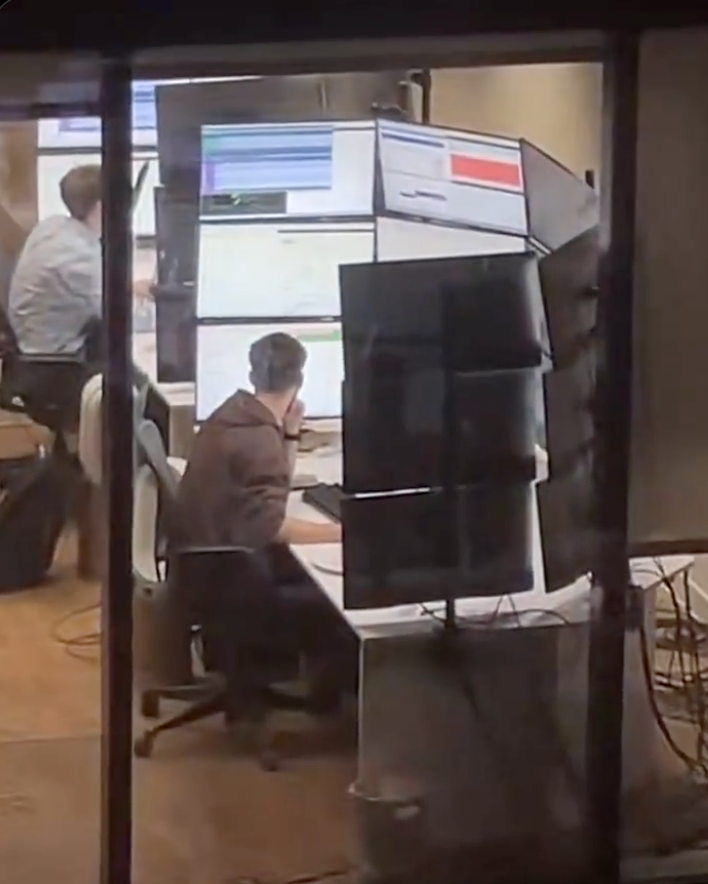
WHERE THE FUCK IS THE CURSOR?

pbs.twimg.com

message-square
70
fedilink
552

WHERE THE FUCK IS THE CURSOR?

pbs.twimg.com

FoxtrotDeltaTango@sh.itjust.works to Programmer Humor@programming.dev · 3 days ago
message-square
70
fedilink

cross-posted from: https://lemmus.org/post/21124885

alert-triangle
You must log in or register to comment.
  • pinball_wizard@lemmy.zip
    link
    fedilink
    arrow-up
    3
    ·
    15 hours ago

    That’s why I no longer code in C#.

  • Chais@sh.itjust.works
    link
    fedilink
    arrow-up
    2
    ·
    22 hours ago

    This is a job for a tiling WM. Imagine doing this on Window$.

  • Raven@lemmy.org
    link
    fedilink
    arrow-up
    2
    ·
    1 day ago

    Wiggle thing on MacOS and you’ll see it. ✨ Got you covered there.

  • Dyskolos@lemmy.zip
    link
    fedilink
    arrow-up
    29
    ·
    2 days ago

    KDE: 500000% size increase and then…

    • Phoenixz@lemmy.ca
      link
      fedilink
      arrow-up
      1
      ·
      3 hours ago

      Loooove for KDE

  • VegOwOtenks@lemmy.world
    link
    fedilink
    English
    arrow-up
    34
    ·
    2 days ago

    • W98BSoD@lemmy.dbzer0.com
      link
      fedilink
      English
      arrow-up
      30
      ·
      2 days ago

      • Noja@sopuli.xyz
        link
        fedilink
        arrow-up
        9
        ·
        2 days ago

        The cursor is on Monitor 3 (there is no monitor 3 but Windows thinks there is)

  • MentalEdge@sopuli.xyz
    link
    fedilink
    arrow-up
    55
    ·
    3 days ago

    KDE: just wiggle it

    • Willem@kutsuya.dev
      link
      fedilink
      arrow-up
      35
      ·
      3 days ago

      wiggle it until it’s the size of a monitor, and if you’re brave, it’ll take over EVERYTHING.

      I love it that KDE didn’t limit the growing of it :)

      • vrighter@discuss.tchncs.de
        link
        fedilink
        arrow-up
        15
        ·
        3 days ago

        i still do this for fun about once a week or so

        • whimsy@lemmy.zip
          link
          fedilink
          English
          arrow-up
          5
          ·
          2 days ago

          One of the few features that I’m missing from niri :')

          • RavingGrob@lemmy.dbzer0.com
            link
            fedilink
            arrow-up
            2
            ·
            1 day ago

            That and the sweet zoom that KDE has built in.

      • marcos@lemmy.world
        link
        fedilink
        arrow-up
        2
        ·
        2 days ago

        Oh, it’s limited. But you will only discover it if you look at the bug-tracker.

  • neidu3@sh.itjust.works
    link
    fedilink
    English
    arrow-up
    38
    ·
    edit-2
    2 days ago

    I had a similar matrix of screens at my old job: Seismic survey observer desk. Three rows tall, four columns wide.

    They weren’t all connected to the same PC, though; If I remember correctly:

    • Top row was one PC (linux)
    • Middle row was another (linux)
    • Bottom left was its own PC (It ran msdos 6.22. Excellent OS for realtime stuff!)
    • Bottom right was its own (linux)
    • middle two at the bottom was windows.

    They were all connected to a Raritan KVM switch, so I used that to select which row to control. The exception was on bottom left and bottom right which had a dedicated keyboard and mouse.

    I have a picture of it somewhere, but I can’t seem to find it.

    • GreenKnight23@lemmy.world
      link
      fedilink
      arrow-up
      8
      ·
      2 days ago

      you’d love synergy. it’s a client you install on multiple devices and allows you to share one keyboard and mouse across as many devices as you want.

      you can even share the clipboard too.

      • neidu3@sh.itjust.works
        link
        fedilink
        English
        arrow-up
        8
        ·
        2 days ago

        Well aware of it. Used it between the top two rows.

    • mojofrododojo@lemmy.world
      link
      fedilink
      English
      arrow-up
      7
      ·
      2 days ago

      Bottom left was its own PC (It ran msdos 6.22. Excellent OS for realtime stuff!)

      really? I used 6.22 back in the day - what’s it still being used for these days?

      • neidu3@sh.itjust.works
        link
        fedilink
        English
        arrow-up
        7
        ·
        edit-2
        2 days ago

        Not sure if it’s still in use today, but the above description was 2008 through 2012. Msdos was used for “gun timing”, which basically amounted to extreme precision when it came to opening or shutting some solenoid valves. The computer had a GPS input and a bunch of serial outputs, and a control line (also serial).

        The control line sent instructions of which solenoid to open when, a time reference was determined by the GPS, and you can probably guess what the serial outputs were for.

    • eldavi@lemmy.ml
      link
      fedilink
      English
      arrow-up
      2
      ·
      2 days ago

      i had a similar setup when i worked at a NOC.

      thank god i never intended to have children. lol

  • trumpetmouth@lemmy.world
    link
    fedilink
    arrow-up
    56
    ·
    3 days ago

    for real though, the CTRL tap accessibility feature to find the cursor is a lifesaver

    • edinbruh@feddit.it
      link
      fedilink
      English
      arrow-up
      79
      ·
      3 days ago

      On KDE and on MacOS, if you shake the cursor it becomes larger

      • CMDR_Horn@lemmy.world
        link
        fedilink
        arrow-up
        64
        ·
        3 days ago

        And larger…and larger…

        • zwerg@feddit.org
          link
          fedilink
          arrow-up
          50
          ·
          3 days ago

          No lying, wiggling my mouse until it becomes HUGE is my go to activity during boring video calls.

          • lengau@midwest.social
            link
            fedilink
            arrow-up
            6
            ·
            3 days ago

            Try putting it on the speaker’s nose and jiggling.

        • mexicancartel@lemmy.dbzer0.com
          link
          fedilink
          English
          arrow-up
          4
          ·
          2 days ago

          Only in KDE, and i think now we can limit that in settings

          • Dyskolos@lemmy.zip
            link
            fedilink
            arrow-up
            6
            ·
            2 days ago

            Who wants a limit to that? Gimme fullscreen-cursor and name him Harry.

            • mexicancartel@lemmy.dbzer0.com
              link
              fedilink
              English
              arrow-up
              2
              ·
              2 days ago

              Tim apple i suppose

        • JeeBaiChow@lemmy.world
          link
          fedilink
          arrow-up
          1
          ·
          3 days ago

          Thats why i also have a thinkpad

    • AeronMelon@lemmy.world
      link
      fedilink
      arrow-up
      16
      ·
      3 days ago

      I guess this confirms that I am a man, because I refuse to do anything except jiggle the mouse until I see it.

      • Klairabelle@lemmy.world
        link
        fedilink
        arrow-up
        14
        ·
        3 days ago

        Am woman, learned today you can use CTRL to find it as I too wiggle it until I find it.

        • vrighter@discuss.tchncs.de
          link
          fedilink
          arrow-up
          5
          ·
          3 days ago

          that’s what she said!

  • chattre@lemmy.blahaj.zone
    link
    fedilink
    English
    arrow-up
    15
    ·
    2 days ago

    KDE shaky shaky

  • Hanrahan@slrpnk.net
    link
    fedilink
    English
    arrow-up
    5
    ·
    2 days ago

    surely just using the terminal?

  • downvote_hunter@midwest.social
    link
    fedilink
    English
    arrow-up
    10
    ·
    2 days ago

    Fooled us all. That’s a tanning booth.

  • ozymandias117@lemmy.world
    link
    fedilink
    English
    arrow-up
    26
    arrow-down
    1
    ·
    3 days ago

    I’m confused… Cursor? Surely you control everything via keyboard?

    • prettybunnys@piefed.social
      link
      fedilink
      English
      arrow-up
      7
      ·
      3 days ago

      ditch the rat

      • FuglyDuck@lemmy.world
        link
        fedilink
        English
        arrow-up
        12
        ·
        edit-2
        2 days ago

        Image with just text saying "ME: it doesn't have a tail, so I'm pretty sure it's a hamster." Tech Support: "Sigh* fine. Right click on your hamster...:

        (Shamelessly stolen from this very community.)

  • CForsyth@lemmy.ca
    link
    fedilink
    arrow-up
    17
    ·
    3 days ago

    Where we're going we don't need any Cursors

    • bss03@infosec.pub
      link
      fedilink
      English
      arrow-up
      1
      ·
      2 days ago

      Where’s we are going: https://www.nongnu.org/ratpoison/

  • tiredofsametab@fedia.io
    link
    fedilink
    arrow-up
    21
    ·
    3 days ago

    right-click and see where a menu opens.

    • crazycaveman@lemmy.dbzer0.com
      link
      fedilink
      English
      arrow-up
      1
      ·
      2 days ago

      pastes into putty

      am I doing it right?

  • 🇰 🌀 🇱 🇦 🇳 🇦 🇰 🇮 @pawb.social
    link
    fedilink
    English
    arrow-up
    5
    ·
    edit-2
    2 days ago

    It would be funny af if there was a way to make the computer think the screen size was infinite (just for the mouse) so you could send your cursor 20 miles away and never find it again.

    • Dyskolos@lemmy.zip
      link
      fedilink
      arrow-up
      3
      ·
      2 days ago

      That’s only funny if it’s not YOUR computer 😁

Programmer Humor@programming.dev

programmer_humor@programming.dev

Subscribe from Remote Instance

Create a post
You are not logged in. However you can subscribe from another Fediverse account, for example Lemmy or Mastodon. To do this, paste the following into the search field of your instance: !programmer_humor@programming.dev

Welcome to Programmer Humor!

This is a place where you can post jokes, memes, humor, etc. related to programming!

For sharing awful code theres also Programming Horror.

Rules

  • Keep content in english
  • No advertisements
  • Posts must be related to programming or programmer topics
Visibility: Public
globe

This community can be federated to other instances and be posted/commented in by their users.

  • 343 users / day
  • 3.55K users / week
  • 9.75K users / month
  • 18K users / 6 months
  • 1 local subscriber
  • 30.7K subscribers
  • 1.91K Posts
  • 59.7K Comments
  • Modlog
  • mods:
  • Feyter@programming.dev
  • adr1an@programming.dev
  • BurningTurtle@programming.dev
  • Pierre-Yves Lapersonne@programming.dev
  • BE: 0.19.5
  • Modlog
  • Instances
  • Docs
  • Code
  • join-lemmy.org