We’re proud to present the first release of GIMP 3.2!
This marks a year of design, development, and testing from volunteers and our community.
Here are some of the many highlights to look out for:
Link Layers
You can now use Link Layers to incorporate external image as part of your compositions, easily scaling, rotating, and transforming them without losing quality or sharpness. It functions similar to the “Smart Object” concept from Photoshop. The Link Layer will automatically update if the external image is changed in another editor – for example, if you include a SVG logo as a Link Layer in GIMP, you can edit it in Inkscape and see the changes live in GIMP as well!
You can create a new Link Layer by choosing Open as Link Layer… in the File menu. You can change the image used at any time in the Layer Attributes dialog, which you can access by double-clicking the layer in the dock or by choosing Edit Layer Attributes… from the layer menu.
Vector Layers
The Path tool can now create Vector Layers, which lets you draw shapes with adjustable fill and stroke settings. The shape of the vector layer also automatically updates whenever you adjust the path, and you can non-destructively rotate, scale, and transform it too
PaintBrush improvements
The MyPaint Brush tool has been upgraded, adding 20 new brushes, including a much-requested arrow brush. It now automatically adjusts to your canvas zoom and rotation for more dynamic painting.
Better Text Editor
Our Text Editor has been the focus of several development projects to improve its usability and functionality. You can now drag the on-canvas text editor to move it out of the way when writing text. Several common shortcuts are now supported (such as Ctrl + B for bold, Ctrl + I for italics, and Shift + Ctrl + V for pasting unformatted text).
Non-Destructive Filter Updates
As well as working on new non-destructive layers (vector layers, link layers, and text layers), we’ve also been working on the non-destructive filters! You can now apply filters to channels non-destructively, in addition to layers and layer groups.
Overwrite Mode
A new Overwrite paint mode allows you to draw over existing colors without blending their transparency. It has many useful applications when working with pixel art
UX/UI improvements
This release includes a TON of small user interface and user experience improvements
New System color scheme
There is a new system color scheme for default themes. If set, it will automatically update GIMP’s theme colors to match the current OS settings.
Automatic transparency
The Crop Tool and NDE filters now automatically add transparency to a layer when necessary, rather than requiring you to remember to do it manually.
Switch between tools easily
You can now quickly switch back and forth between your 2 most recent tools with the Shift + X shortcut
Welcome Dialog improvements
The Welcome Dialog has received improvements to help streamline user workflows.
It now recognizes the Ctrl + 0, 1, 2… 9 shortcuts for opening the most recent images.
It now recognizes your shortcuts to create a new image, or open an existing one (whether the respective default Ctrl + N or Ctrl + O, or your custom shortcuts)
The Welcom Dialog no longer appears if you intentionally open GIMP with an image
Flip images with your keyboard
The Flip and Shear Tools now respond to the arrow keys, similar to the Move and Rotate Tools.
Flip Tool: You can use the Left and Right arrows to flip the image horizontally, and the Up and Down arrows to flip it vertically.
Shear Tool: You can use the Left and Right arrows to shear your image horizontally, and the Up and Down arrows to do the same vertically. Like the Move tool, you can hold down Shift to shear with a larger value.
For Script and Plug-in Developers
GIMP 3.0 brought non-destructive filters and a new GimpDrawableFilter API for script developers to create them. However, it wasn’t easy to find the names and properties for the extensive list of potential filters, especially for third-party GEGL filters. A new GEGL Filter browser has been added to make it easier to find non-destructive filters to use.
New formats
GIMP 3.2 includes built-in support for even more file formats! These range from well-known formats like APNGs to obsolete archival formats such as Seattle FilmWorks photos, supporting your quest of old data retrieval. For retro game developers, we now support Sony PlayStation TIM and Sega Dreamcast PVR textures.
We also added export support for JPEG 2000 images, which is the standard for the digital cinema industry. This now matches our import support, which we’ve had since GIMP 2.8
In addition to our existing darktable and RawTherapee plug-ins, we’ve added support for using ART for editing Camera RAW images.
As a side effect of adding support for NASA‘s .hgt.zip image format, GIMP can now load compressed images from any format that we currently support.
Total Ink Coverage value
You can now see the Total Ink Coverage value for a color in the CMYK Color Selector. This is useful to know when soft-proofing your image for printing, as your printer may have an ink coverage limit to prevent over-saturation of the page.
https://www.gimp.org/release-notes/gimp-3.2.html#usability-improvements
This release is a true GAME CHANGER!! Nothing will ever be the same. Adobe just got punched right in the face.
You can support Gimp
-
If you’re a developer, we always welcome more code contributions – we’ve even marked some reports for “Newcomers” to help you ease into the codebase.
-
We’re looking for more feedback from designers to help create a better user experience.
-
You may also donate to support the existing team members.
Thank you SO MUCH to developers, designers, translators, testers, donors and all members of our community 👏🏼👏🏼
I wouldn’t call this a “face-punch” to adobe, but GIMP is one of those softwares that just keeps getting better with every update no matter what
they finally fixed their awful text editor!
If they really want to punch Adobe in the face they need to give GIMP’s UI the Blender treatment.
at minimum it would be nice if they just looked at the spacing and organization of the different palettes. This does not look tidy… or professional, really. It looks cramped and messy.
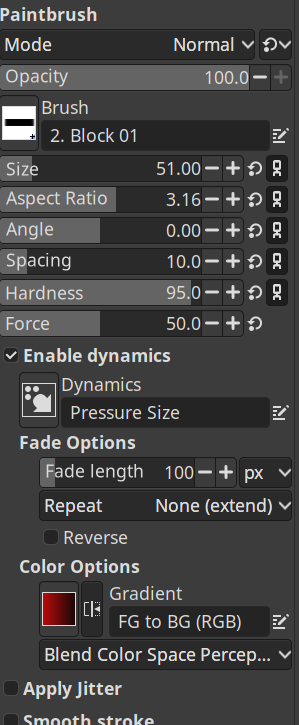
Half the elements are sharp, half are blurry. Icons look different sizes. Random amounts of spacing between elements. This is the UI of a piece of graphic editing software too…cmon guys.
From my experience Gimp also has issues when one of the screens connected to the pc has fractional scaling. It just makes the UI look like shit on all screens for some reason.
I made a theme which is more professional-looking and less busy/cramped if you’re interested:
https://jpicture.net/printroomexpertsuperflat/
I’m about to release a dark version of it too.
Nice ! have you considered submitting a PR so that this might get added to the GIMP default install ?
Thanks! Yes, I thought about it, although it would need some additional work as each in-built GIMP theme is structured to draw on common files, whereas mine are standalone. Totally possible though. Maybe when I have a complete set (Grey, Dark and Light), and if they’re popular, I’ll post something on the Gitlab and see what they say!
Great, I’m sure it will be well received. When I see the number of outside contributors that one day decide to fix something in Blender, and how many of em stick around, I think to myself, it’s such a virtuous cycle. So many people seem to be piling on Gimp because of its UI (at least some of it is unwarranted and due to reputation I’m sure), I wouldn’t understimate the potential impact of a “simple” theme.
Thanks, that’s very encouraging of you :) This was the first time I’d ever made a theme (or even used CSS) so it was quite a long process. It’s really nice to hear that someone else has found value in it.
So many people seem to be piling on Gimp because of its UI (at least some of it is unwarranted and due to reputation I’m sure), I wouldn’t understimate the potential impact of a “simple” theme.
You know just this afternoon I started wondering the same thing… It kind of blew my mind to think that all the vitriol online about the UI could just be a case of theming. No one is very specific about their complaints, so it hadn’t crossed my mind.
I think if I get a good response to my dark theme too I will approach the devs and offer to help implement it as a core part of GIMP. BTW if you fancy testing it out let me know - I’d appreciate it getting tested on another system before I release it.
Nice, I’ll check it out
Cool, let me know what you think - I’m open to feedback 👍
well, the first thing is that you might want to update the instructions for finding the themes folder. In Gimp I had to look under preferences-interface-theme to find the folder – and even then it was a bit of a journey, since I installed it with flatpak, so the folder ended up being in /var/lib/flatpak/app/org.gimp.GIMP/x86_64/stable/5c600asdghjsd0cfe6e9e5bcf71a2e8a1a7e0ca018f43aabfa38dc12bd0954034f06/files/share/gimp/3.0/themes/
…while the Gimp settings just say app/share/gimp/3.0/themes/THANK YOU!
Ah good old flatpak strikes again.
I’d forgotten that flatpak is a pain for this and I ended up manually working around it.
I’m thinking of adding the following to the download page:
“When installed via Flatpak, GIMP folders can be hard to find. I recommend creating your own folder for downloaded themes and adding it to GIMP: Create a new folder e.g ‘my-gimp-themes’ somewhere that makes sense to you and then place the unzipped PrintroomExpertSuperflat folder inside it. Then, in GIMP, go to Edit > Preferences > Folders > Themes, click the ‘Add a new folder’ button on the left and then the ‘Open a file selector…’ button on the right and select your my-gimp-themes folder. Finally, click the OK button. New themes will become avalable after restarting GIMP. All further theme downloads can be placed in the my-gimp-themes folder.”
Would you mind letting me know if that makes sense and works for you? Thanks!
I might be dumb, but… it looks fine. I didn’t really have other expectations besides it being functional and it functioned.
It worked for my small “projects” and I didn’t have problems finding different features.
My default theme looks perfectly fine…

Edit: this is the default system theme on Windows, tried the other theme and it also looks awful.
dude, at least screenshot the same palette

That’s just system default theme on Windows
it does look a little better, but I still think it’s messy
deleted by creator
Sorry for OT, but I love your username, yum!
hehe, nice to see people here actually recognize the food, not mistaken it as another thing, as it happened previously.
For me it’s space efficient. What’s up with all the white space everywhere else? Do you have the same issue with Blender?
no, I’d say Blender looks a lot better. I tried to find a roughly equivalent palette for comparison:
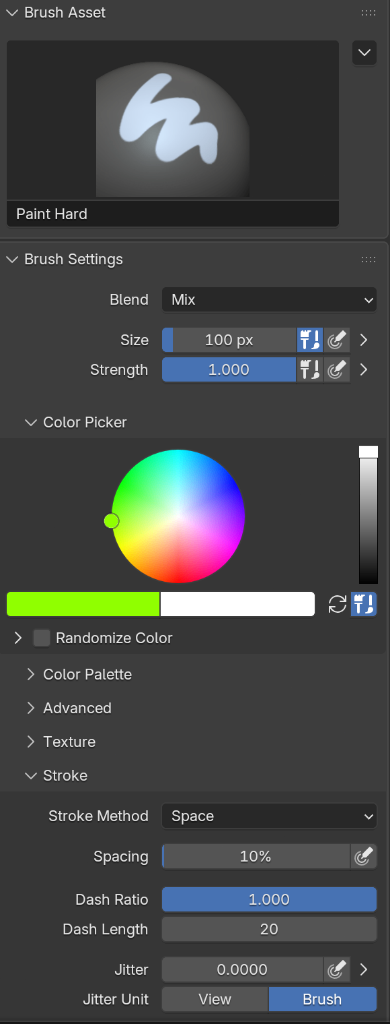
Hm not sure. I wasn’t able to resize the color picker window. If I’d paint uvs by hand I wouldn’t be able to pick subtle color differences with that size…
click the color preview, and you get a slightly bigger circle and you can also enter HSV and RGB values manually
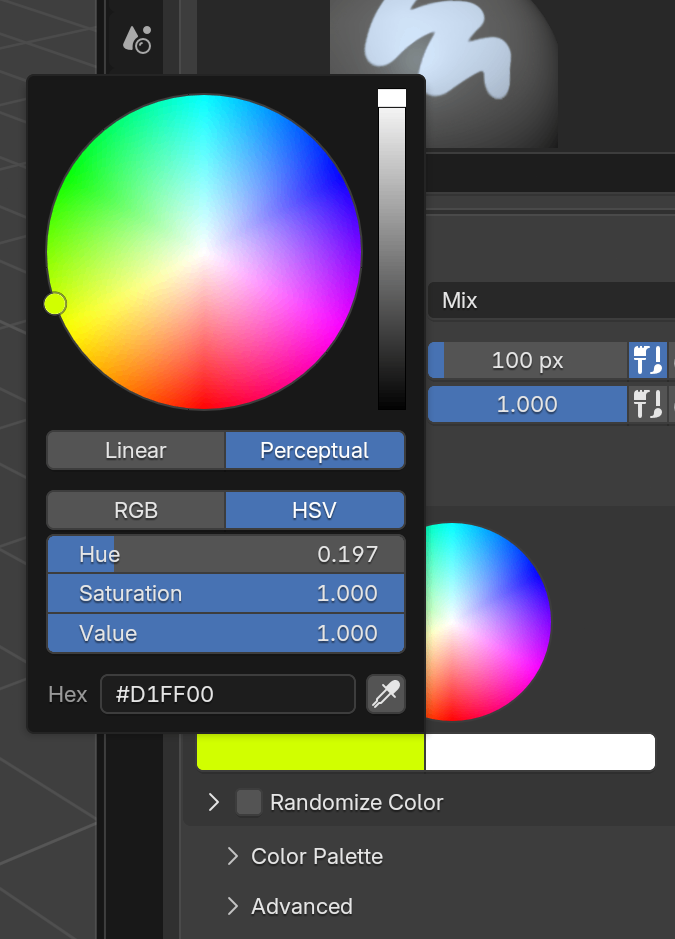
White space is good
If you need a different GIMP UI, PhotoGIMP is a patch that may make it more useable for you.
Wow, never knew this existed. I usually don’t use gimp all that much compared to inkscape - so I’m not sure if it’s worth the trouble…but this is very nice. I honestly don’t know what they wouldn’t pull these settings into the default gimp, even if only as an alternative skin option you can select.
The major drawback of gimp for many people is the interface, I think. That’s why blender has really taken off since it’s UI/UX update.
It wasn’t until a couple years ago that GIMP finally made single window mode the default. They are irrationally against fixing their UI.
No they are just severely limited by dev time (and even more by a lack of UI designers). They have less than a thousandth of Adobe’s resources. Why don’t you help improve it?
It’s not dev time to fix UI complaints that have been made for 20 years. They have added hundreds of complex features in that time.
It was their ethos to not be Photoshop no matter how convoluted their alternative workflow needed to be.
@Blue_Morpho @mech We actually welcome user feedback and try to make improvements as we’re able. We have a dedicated UX site now (https://gitlab.gnome.org/Teams/GIMP/Design/gimp-ux/-/issues) and we encourage people to share designs and discuss proposals for implementation.
Why not merge or give the option to install PhotoGIMP during installation?
PhotoGIMP doesn’t fundamentally improve anything. It just rearranges the tools and keyboard shortcuts to copy Photoshop.
Personally I tried it and hated it, cause I’m used to the GIMP layout and never used Photoshop.
And the purpose of GIMP isn’t and never was to just be a copy of Photoshop.
Trying to turn it into one will attract lawsuits.
There’s two screenshots. One is just promotional art.
The other one doesn’t look much different to me than the single window mode Gimp introduced some time back.
Why aren’t there any side by side screenshots pointing out what is different?
I think it is great that people made the effort for this, but like almost all github projects they really lack a good showcase of what they have.
This video gives the install overview, plus does a good comparision of stock and PhotoGIMP.
Eh. It helped a little, but the menu and button interface are not the biggest problems. It’s the way the tools work, or don’t work, that causes me the most issues.
Thanks friend! I remember GimpShop from back in the day, glad to see something else has picked up the torch.
gimp qt/imgui port when
Spirituality it’s probably krita. Though they have different focuses in mind. Krita is very much more oriented to painting etc.
I’d use krita if there was a “editing” toggle that switches it to a GIMP-like interface, since I never really do digital art
I do have friends that love krita, though
Krita has some features I wish gimp had and vice versa. And I absolutely do use krita for editing sometimes. At this point 30 years of familiarity with gimp gets in it’s way a bit. But I’m glad we have both.
Though if GIMP ever switched to QT that would be nuts. Once the reason and naming influence for the GTK behind GNOME. Now an almost secondary and separate concern left so far behind the rest of the suite. Gtk 5 is in planning and gimp just managed to get to 3 after a decade of hard work and planning. Though a lot of that was back end code. Not really UI or elements of. I’ve only dabbled a bit in GTK and QT over the years. I’m not sure if there would be much reason to switch toolkits. Though easy effects did.
Though if GIMP ever switched to QT that would be nuts. Once the reason and naming influence for the GTK behind GNOME.
They could call it QIMP and release QtTK and make Gnome switch to Qt and rename to QNOME 😍
I think the GTK guys learnt their season about smashing an API. Apparently from GTK3 to GTK4 is much better.
Though of course, next might be a fresh batch of developers thinking backwards compatibility is just holding them back. GTK is far from the only place this happens.
If they really want to punch Adobe in the face they’d change their name to something not related to sexual kinks.
Maybe BDSM? Bundled Digital Scalable Media-editor
It is also a derogatory term for disabled persons. So yeah, not great.
Also you might say something is GIMPed if it’s been broken or messed up in some way. A bad name all round.
Huh?
A Gimp is someone in a (Gimp) suit with holes, usually in a submissive role.
I get that but that wouldn’t be a punch in adobes faces. That wouldn’t significantly increase users since nobody cares about that.
Look at git.
You’re being downvoted but it’s true. The GNU Image Manipulation Program is held back by its inappropriate name. Not only does it have several problematic connotations it is also just not a very flattering term in general. To describe something as gimped is not a compliment.
As techies we’re sympathetic to the project and are likely to give funny or inappropriate names a pass, but think about how “normies” would see it, especially in e.g. a business or education context, with knowledge of the derogatory meaning(s) of the word.
There was a serious move/fork to call it GLIMPSE a while back, but it got abandoned. https://itsfoss.com/gimp-fork-glimpse/
The name is a bigger problem than many think IMO
I personally always rename the launch icon on machines just because so many people comment on seeing GIMP on the desktop or menu.
A bite in the ankle, but still damaging. Go GIMP!
Just keeps getting better with every update no matter what
It’s crazy how we have reached a point were a piece of software is good when it doesn’t get worse with each update.
Nothing says “gratuitous overstatements” quite like marketing copy.
I’m pretty sure “Gimp marketing” didn’t come up with this one.
Lol – they should a tho!
Yes, that’s not even a slap. It’s a gentle caress on the cheek.
well the affinity pro release sure seemed like a solid punch.
Affinity gets shit for not being open source, but Heck! it’s really a pro suite, and free, what are you complaining about!
I like the workflow and UI way better than Adobe’s, and the feel is like driving a Miata on a mountain road, insted of Adobe’s coaler pickup.
“Free” software has a way of becoming paid. They put more and more features behind the paywall over time. Sketchup and Fusion 360 come to mind.
what are you complaining about!
Apparently that it is not open source?
It’s not really free (libre), merely “free” (gratis). Since that’s something that matters to me I won’t use it.
Windows and Mac only sucks though.
What was wrong with the text editor?
it was very glitchy in my experience
The slowest weakest face punch in history, but sure.
That’s what FOSS is all about… the steady march to perfection.
While commercial applications must enshittify themselves in order to survive, open source is mostly immune. It isn’t fast, but it is inevitable that an open source product will eclipse the commercial one.
cue users of adobe products since 1950 complaining about how gimp ui is not intuitive after trying it for a full 5 minutes :)
I find Photoshop not intuitive too, because its different from GIMP.
You can add PhotoGIMP to change the layout to be similar to Photoshop.
I’ll check this out but I’ve been a gimp user since forever so I’m actually most likely better off with the vanilla ui
I switched to Krita. I wish I’d discovered it sooner. Gimp has Blender brain regarding its UI. It took forever, like 20 years, for Blender to realize people don’t want to re-learn how to do everything. It’s a fucking pain in the ass. It’s been so much easier migrating to Krita.
Upvoted, because that’s me.
Although, since I have no professional reason for paying for Photoshop anymore, I’m forcing myself to learn GIMP.
Try Krita. You won’t have to force yourself to learn it. It’s almost exactly like PS.
I’ve never used PhotoShop, and respect GIMP as a useful and powerful tool.
But when I need to use it, before I even open a file, I open a browser window, because I’m resigned to the fact that I’ll be searching for how to do anything.
Intuitiveness aside, it is very messy, unorganized and painful to navigate
I used Photoshop for over a decade, took several classes, spending thousands of hours using it. I quit using it when they wanted me too pay for it as a service. Recently I tried GIMP, and though it took me a while to find some things, I’m now doing everything I could do previously with Photoshop, ironically except link layers. That was the last thing I needed to fully endorse GIMP, and it seems to be exactly what I needed. Fantastic work!!
How did you adjust to not having layer styles in gimp, the workarounds are very tiresome
That and shape layers are what holding me from using gimp fulltime
@anticurrent @webdoodle We have non-destructive filters now, so you can apply pretty much any filter as a “layer style”. Like, you can add a Drop Shadow, Outer Glow, etc to any layer and it will be adjustable afterwards (unless you choose to merge down).
We have vector layers in 3.2, so it’s just a matter of designing a tool to make “preset” vector layers in certain shapes. We have it as GSoC project for this summer, so hopefully someone will take it up soon!
What are link layers and why do you need them?
It is described in this very post…. Layers that are linked from outside files (like an image or an svg) that dynamically update when the file is changed in another program.
They are explained in the post.
I have no idea what almost any of that means but I assume professional graphics designers will. And go gimp! I still struggle with understanding how to do things whenever I need to do something new but I absolutely and exclusively use gimp for image editing. I am forever grateful for such a great tool.
PS: please don’t accept slop contributions ever
as a media professional i can tell you that the non destructive editing features are huge. that used to be the first thing I’d point out as a specific reason i didn’t use gimp.
the ui/ux is still the biggest problem, but honestly THIS was a big part of the issue. how tedious is was to make itterarive adjustments.
may the kindly lords of foss save you if you did work for a client and they wanted you to change something minor. if you did it all destructivly in gimp, you basically just had to start over. now you can organize by linked layers and vector layers to create layer masks and adjustment layers. it’s most useful for photo manipulations and composites, but I’m sure most advanced users will find it solves something for them regardless of what they make.
this isn’t enough to get me to switch, but it’s a great step in a good direction. I’ll always be supportive of that.
thank you for some additional insights about non-destructive editing, that makes a lot of sense :) I hope you can eventually switch over.
They can add all the features they want, but it won’t be usable until they fix their damn UX/UI.
After working for ~30 years with adobe software, when I switched to Linux I learned inkscape in no time. Same happened with Affinity Studio. Both are great, intuitive.
Gimp’s is just a hot mess
This work for you?
Inkscape didn’t need to copy Adobe to be intuitive.
Disclaimer:
I’ve never used Adobe’s photoshop.What’s wrong with GIMP UI/UX? I’ve used it for small stuff and it did the job. It was… fine? No complains.
So a genuine question: what’s wrong with it for someone who uses these programs more in depth?
I used PS for a few years then switched to GIMP. Initially I thought it was confusing (to be expected) but a friendly colleague showed me the basics and now I prefer it. Learning took hardly any time really.
Found the tenth dentist.
I read that as “teeth dentist” and was really confused for a minute there
The main thing I always stumble over is selecting and “floating”, all of that seems unnecessarily complex.
Also, filters won’t apply to masks. In Photoshop, you can just add a channel, paint a mask and use any of the filters, and then keep that channel to use as a selection–it’s easy to make any channel a selection, including the color channels and alpha channel. It sort-of works in GIMP, but filters won’t apply to the channel.
The update announcement is precisely about adding this one feature. But reading is hard, I know.
deleted by creator
See, coming from RISC OS, the GIMP interface made complete sense to me straight away. It was never broken, just from a different school. These days, it can be setup very PS like, but that doesn’t mean it was wrong before. Just different.
Enable single window mode.
I just 100% all-the-time will always want someone to release a fork of GIMP that is totally identical in every way but has a different name. I can’t tell you the amount of time it was rejected by schools because of it.
That was already tried, not very sucessfully. It was called glimpse.
Wow, that would have been a great name.
English speaking country problems
Is it really a problem? Or just an imagined one from some people?
GIMP is an English acronym.
Yes, nobody in Korea or Thailand cares and they just enjoy the software, that’s the point
Just rename it Jump. It doesn’t have to make sense, it’ll still be an improvement.
Jimp, just like Jif. (Lost the dice roll, I have to submit this idiocy. Dammit)
GIF peanut butter is delicious.
Jraphical is the right way to say it.
Sounds like someone put a bunch of gimps in charge of those schools.
Bring 'em out.
I assumed it was a foreign thing, but no, it was actually made in America.
Kimball and Mattis formed the acronym GIMP by adding the letter G to “-IMP”

This release is a true GAME CHANGER!! Nothing will ever be the same. Adobe just got punched right in the face.
This is an absolutely ridiculous statement…
Its getting better. Doesn’t mean it’s the best yet.
Keep the good work. And listen to feedback.
Its getting better. Doesn’t mean it’s the best yet.
Are you implying that a particular older version of GIMP was the “best” version and that current versions are worse? Or what are you saying?
It means GIMP is constantly improving but there is still quite a bit of room for improvement, where, maybe in comparison to an established industry standard such as Photoshop, it does not leave nearly as much to be desired.
Exactly
It takes quite a shitty attitude to look at a comment which clearly only showed support for GIMP and then turn it into a semi-debate. It’s almost impressive.
It takes quite a shitty attitude to look at a comment which clearly only asked for clarification and then turn it into a semi-debate. It’s almost impressive.
I am excited about new GIMP and somehow still exhausted with current GIMP
“Better text editor” makes me chuckle how I took a picture I edited in GIMP to Paint always when I wanted to add some text on it 😂
Was somehow much less painful on Paint to do itI know your comment definitely isn’t implying that GIMP is currently still awful for editing text, but I am curious how long ago you are talking about. I have used GIMP as my primary means of making memes over the past few years or so (which often involves adding text), and have never felt inclined to use a different program just for text.
I just checked - I’ve been running version 2.10.24. I see the About gimp -window speaking of an update for 3.2.0 upon opening the software.
Still no shape tool /j
The long awaited shape tool is coming up next. So the next GIMP version is shaping up to be a great release. This reply is in no shape or form a word play. :>
Sigh, okay, I’ll try it again.
Like I do every time there’s a huge update. Will this time be different? I hate Adobe, but the Gimp has yet to live up to its promise to replace it. I’d love to never give Adobe another cent, but we’ll see.
Try PhotoGIMP - the UI layer really helped me start using GIMP now that my muscle memory from Photoshop can be leveraged…
Damn, that sounds great! Hard to believe we’re already at 3.2, it felt like I was waiting for 3.0 for a decade!
OP… It’s a software release. Stop with this unnecessary tribalism bullshit
I’m not for “tribalism” if it’s related to a specific piece of software vs. another. But I definitely am on the side of open source vs. a garbage subscription based model of closed source software.
I find the vibe unnecessary as well, but I think it’s more than tribalism, the stake here is freeing generic image editing from the capital
Do you tell people at the bar to calm the fuck down when the hockey game is on?
Hockey is full of chuds; you won’t find me anywhere close to a sports bar.
lmfao had no idea lemmys supported bigotry so much
So you don’t tell them to calm down, you just stay away. Hm.
Oh you must be FUN at parties, just try Gimp it’s awesome
The fuck has anything in this thread had to do with bigotry? Bigotry against what? Software? Hockey?
Or do you just call everything that offends you ‘bigotry’?
they have no idea what they’re talking about but they still feel the need to butt in
bless your heart
My friend. You’re the one that needs to explain what you meant by “bigotry” and what was bigoted. We can’t read your mind.
You’re being given a chance to explain yourself. You, responding with a vague condescending comment, literally just sounds like you’re having a conversation in which you’re only trying to convince yourself of something.
I may have put them off by being too aggressive. I’m pretty annoyed at this point, but if someone is engaging, maybe I should dial it back?