While that’s true, Logitech’s MX Master has its upsides. First, you don’t need to use a specific USB dongle for it. Instead, a single Logitech USB receiver can connect to up to 3 devices, so you have the freedom to connect with either the dongle or the computer’s Bluetooth.
As a result, I have a single MX Master 3 connected to three of my systems. In comparison, my wife bought a Microslop’s ergonomic keyboard and it’s now just a brick because the Bluetooth dongle broke and there’s no solution.
Which one? Please do share the link or name as well. My MX Master 2 died recently when I tried to replace its switches to make it silent. Right now, I’m using MX Master 3, but I find it less reliable than 2, so I’d love to hear about a budget mouse I can use that’s also ergonomic and similar to these mice.
I disagree with that. I like the MX master series, but I found MX Master 3 worse than 2/2S. My wife and two of her friends bought it and all the mice developed a left-click button problem after about 1 year.
In contrast, MX Master 2 (or 2S, I don’t remember now) worked for more than 3 years for me. I only had to clean it once to fix a scrolling issue. It finally hit the bucket when I replaced its switches to make the mouse quieter.
Yeah they make an MX Master clone. And the config software runs in the browser so it actually works on Linux. And they look super nice and “minimalistic”, in my opinion.
One of my favorites features on the logitech mouse is the scroll wheel that seamlessly switches between smooth continuous scrolling and stepwise scrolling. Do you know if it has cloned that feature as well?
No idea. I usually use Solaar. And I’ve like 4 receivers laying around. I haven’t had any issues with that. The only issue I had in the past was that the keyboard would break connection at times (I also have K860), but I connected it with CPU’s Bluetooth connection, I think.
But they used to have Unifying Receivers that could handle 16 devices, and I don’t think a bad cert would cripple the software. Didn’t they stop making those a few years ago.
But think of the innovation: in those days there was no way they could get you to install their buggy, insecure software that requires you to log into an online account so they can track you and push ads to your desktop. And mice didn’t even have batteries that would fail after a year or two, forcing you to get a new mouse. Heck, you didn’t even have the experience of the mouse seizing up in the middle of your workday because the battery ran out, or becoming intermittently unusable because of interference from USB 3. Those were dark days indeed.
In PS/2 days and before, there was no need for a driver. But it was just a pointing device, no fancy anything. Still, though, it was a tank. [And it had a nice lead ball in the middle that you could yeet at your brother, when he was being a wanker]


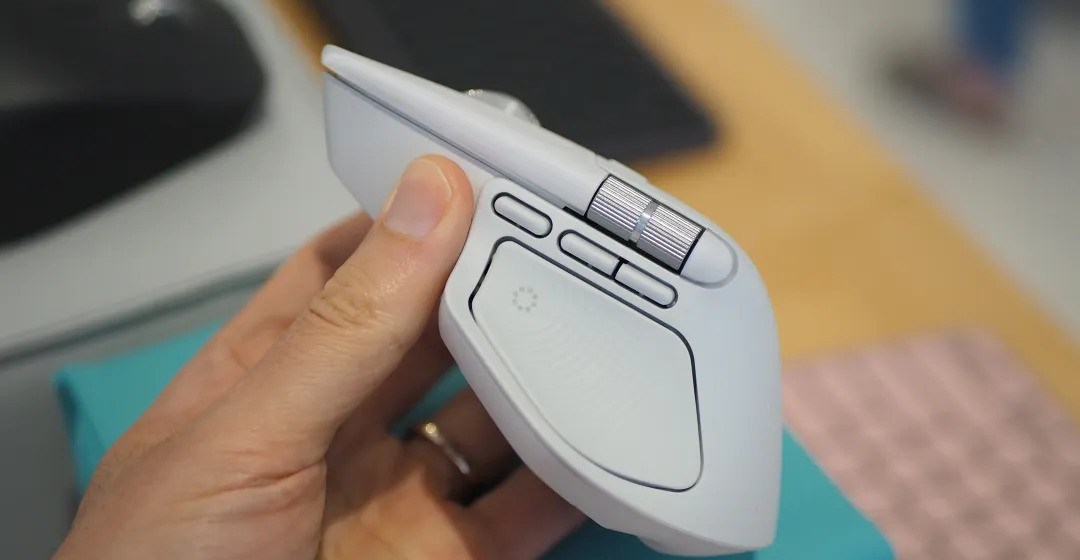
It’s a mouse, they used to just be a simple thing you plug in, get a basic driver from the OS and it makes a cursor move.
But, how to add AI to it without 200Mb companion application that also serves ads?
200? Those are rookie numbers
Apple doesn’t care what you do with your driver as long as you keep paying them.
This one’s all on Logitech.
https://lapcatsoftware.com/articles/2026/1/2.html
While that’s true, Logitech’s MX Master has its upsides. First, you don’t need to use a specific USB dongle for it. Instead, a single Logitech USB receiver can connect to up to 3 devices, so you have the freedom to connect with either the dongle or the computer’s Bluetooth.
As a result, I have a single MX Master 3 connected to three of my systems. In comparison, my wife bought a Microslop’s ergonomic keyboard and it’s now just a brick because the Bluetooth dongle broke and there’s no solution.
My pop’s cheap Chinese mouse does the same thing, and it doesn’t rely on the internet (and, yes, I checked firewall logs).
Which one? Please do share the link or name as well. My MX Master 2 died recently when I tried to replace its switches to make it silent. Right now, I’m using MX Master 3, but I find it less reliable than 2, so I’d love to hear about a budget mouse I can use that’s also ergonomic and similar to these mice.
Bluetooth mice are also limited to a 250hz poll rate iirc
I honestly can’t tell the difference between 250hz and 8kHz. And I bet most people can’t either.
IMO MX Master 3 is the best mouse ever made.
I disagree with that. I like the MX master series, but I found MX Master 3 worse than 2/2S. My wife and two of her friends bought it and all the mice developed a left-click button problem after about 1 year.
In contrast, MX Master 2 (or 2S, I don’t remember now) worked for more than 3 years for me. I only had to clean it once to fix a scrolling issue. It finally hit the bucket when I replaced its switches to make the mouse quieter.
Never use the 2/2S I just really like the 3 ¯\_(ツ)_/¯
I like Keychron mice. They look much nicer and they have comparable models.
Didn’t know about these. The M7 looks nice
Keychron doesn’t appear to be US based so that’s good… are they UK? Sources disagree.
Based in China, ofc.
Didn’t know they have mice, too. Might look into those, since I’m very happy with the keyboard I have from them.
Yeah they make an MX Master clone. And the config software runs in the browser so it actually works on Linux. And they look super nice and “minimalistic”, in my opinion.
One of my favorites features on the logitech mouse is the scroll wheel that seamlessly switches between smooth continuous scrolling and stepwise scrolling. Do you know if it has cloned that feature as well?
Yes, it’s in the listing images:
https://www.keychron.com/collections/mice-collection/products/keychron-m6-wireless-mouse
Hopefully you never have to update the firmware on your receiver.
No idea. I usually use Solaar. And I’ve like 4 receivers laying around. I haven’t had any issues with that. The only issue I had in the past was that the keyboard would break connection at times (I also have K860), but I connected it with CPU’s Bluetooth connection, I think.
I just got a K400 for $2 so I shouldn’t complain too much but it’s a bitch trust me. (The guides said to use solaar. They were wrong)
But they used to have Unifying Receivers that could handle 16 devices, and I don’t think a bad cert would cripple the software. Didn’t they stop making those a few years ago.
They stopped, yes, in order to replace them with the abysmal excuse they have now.
But think of the innovation: in those days there was no way they could get you to install their buggy, insecure software that requires you to log into an online account so they can track you and push ads to your desktop. And mice didn’t even have batteries that would fail after a year or two, forcing you to get a new mouse. Heck, you didn’t even have the experience of the mouse seizing up in the middle of your workday because the battery ran out, or becoming intermittently unusable because of interference from USB 3. Those were dark days indeed.
In PS/2 days and before, there was no need for a driver. But it was just a pointing device, no fancy anything. Still, though, it was a tank. [And it had a nice lead ball in the middle that you could yeet at your brother, when he was being a wanker]
[Edit]