DIYer picks a “little insane”-looking setup for less tracking, more control.
That’s basically my setup, lol. Except the laptop is just old but otherwise intact.
Boots into OpenBox with some custom startup scripts to auto launch a fullscreen browser to my Emby server, a little python daemon I wrote to control various things (screen on/off, volume, etc) via MQTT, and some webhooks from Emby to tie it into my HomeAssistant.
All my DVD/BR library has been ripped to my server, local OTA feeds in from my HD Homerun tuner, and can use my phone or anything with a web browser as a remote.
I refuse to use my money to buy an ad platform.
Same buddy. I use a projector and a laptop with an air mouse and my ‘apps’ are just browser shortcuts set to auto open at specific urls in kiosk mode.
Is there not an issue with the likes of streamers capping resolution on desktops? Maybe you dont use streamers at all.
Not a huge problem for me: they cap the resolution at 1080 but that’s what my projector does. Looks pretty good on my wall. Plus I only currently have HBO myself…but yeah 4k bluray/jellyfin looks just as good because the projector is the limiting factor anyway.
I’d love to see Linux folks figure out easy ways for consumers to replace the on board OS’s for any TV out there. Can that be done?
DRM crap ruins the typical end user experience.
You can thank Torvalds for supporting TiVoization.
Huh? What did I miss?
What you missed is how Linux is GPL v2 only, not “or any later version,” which stopped it from gaining the anti-tivoization protections from GPL v3.
Buddy, we can’t even get phones fully working. Though apparently and Amazon echo can boot linux.
The issue usually is proprietary streaming services, not a lot of interest from them on Linux/etc support and the unofficial options are usually kind of janky. That does make total sense but also kills it’s chances of getting wide support / adoption which limits the growth of the projects.
Lineage OS supports some TV boxes
It usually uses strong cryptographic verification with very specific proprietary firmware.
In short very hard. It is easier to get a separate device
hum, why go the whole custom interface way when he could use kodi? I have a dumb HD (not gull HD, just HD, that’s how old it is) connected to a rPi with Kodi. Kodi has the jellyfin plugin to connect to my jellyfin server. I even had the DVB-T adapter so I can watch regular TV. When I’ll eventually buy a new TV I’ll just connect the rPi to the new one.
Yeeeeah, I was gonna say this, too. There are easier, nicer looking ways to drive your media consumption through a computing device on a TV. Hell, there are very nice vertical mounts for laptops that look good as a showpiece, no need to strap the thing to the back of the TV.
But hey, it’s a kid doing a hobby project. It’s a fun thing to do. I support it.
I’ve tried this myself, but I’ve found that you really need to commit to mainataining your own media library, or to using pirate streaming services.
None of the big name legal streaming services work well through Kodi plugins due to the DRM on the content. Usually end up with stuff limited to 720p, stereo, no hdr.
I really wish the streaming companies would chill so it was easy to get a single unified interface for all my content in the highest quality available, but no, someone might pirate it in a marginally easier way then they already can!
Yeah, that’s true, but I’ve been a sailor of the high seas for as long as I’ve had an internet connection. And all the *arr stack makes life really easy now. I do pay for the subscriptions, I just don’t use them.
I like Android TV (Lineage OS) better
Isn’t rPi underpowered for anything media? Last one I tried to run even struggled just opening a browser, much less a video. rPi3 or something…
I use an rPi3 and h264 is decoded without problems natively. For h265 files I have an old nvidia card on the jellyfin server that does hardware transcode on the fly.
deleted by creator
Is resolution capped? Netflix had prevented high bitrate 4k on desktop previously. In fact I think it was capped to 720.
Is the resolution capped for desktop mode?
Rooted LG oleds are tolerable with pi-hole, and have a 92.7% WAF.
WAF = Web Application Firewall? Or is there some other meaning?
Wife Approval Factor 🤣🤣
Well, that makes much more sense in that context 😅
Welp…I know what I’m doing tonight.
I’ve got a similar setup except I have a dock under my TV that I connect my steamdeck to and a Bluetooth keyboard and mouse that sits under the coffee table. Using sway would be way nicer and allow me to browse with keyboard. Fuck smart TVs they are actual garbage.
deleted by creator
All my Android TV devices boot into the Android TV home screen which does have ads. How do you avoid this?
deleted by creator
I don’t know what you consider an ad. The Android (or Google?) TV launcher looks like this:
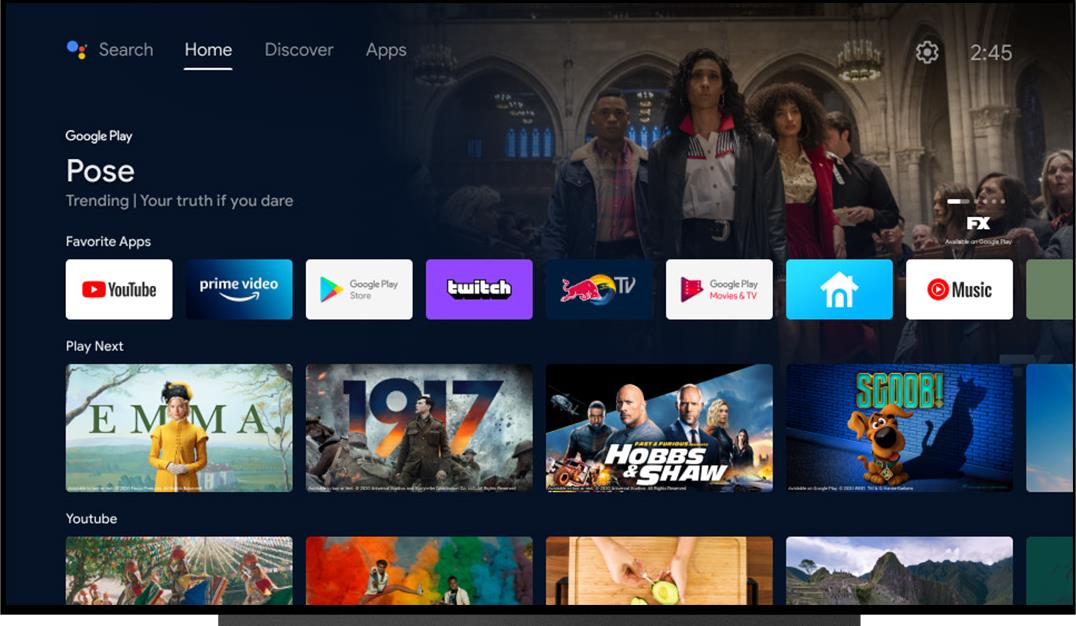
Discover tab is an ad. IIRC, “Apps” also contains ads for applications to spend money on one way or another. The whole area below is an ad. Under your application-specific entries, there’s more ads (something called “popular movies” or so). And no, you can’t change the launcher to start by default as you can with phones. This is on a device sold in the EU.
deleted by creator
This is both on the TV itself and on an added Android TV box that I have; neither allow removing the ads fully or changing the default launcher. Same problem but different ecosystem with the fire sticks.
If there was no other way, I’d attach a shield to it and forget about the “smart” of my tv
I bought the Android TV box for AV1 support, does the shield feature that?
deleted by creator
Av1 means your tv’s 1st external input?
No, AV1 being the video codec. https://en.m.wikipedia.org/wiki/AV1
My box is actually certified and should play 4k Netflix. Am not subscribed though, bit it does for Amazon Prime Video.