ShredderFeeder@shredderfood.net to Selfhosted@lemmy.worldEnglish · 1 month agoAddiction....shredderfood.netimagemessage-square81fedilinkarrow-up1271arrow-down17file-text
arrow-up1264arrow-down1imageAddiction....shredderfood.netShredderFeeder@shredderfood.net to Selfhosted@lemmy.worldEnglish · 1 month agomessage-square81fedilinkfile-text
minus-squareJankatarch@lemmy.worldlinkfedilinkEnglisharrow-up3·1 month agoIs there any advantage of using du over df for this?
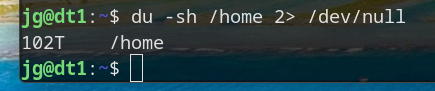
minus-squarebitjunkie@lemmy.worldlinkfedilinkEnglisharrow-up16·1 month agoSomeone may eventually write CLI programs called hast and mich that you can somehow usefully pipe to it
minus-squareEphera@lemmy.mllinkfedilinkEnglisharrow-up8·1 month agodf only shows partitions, whereas du adds up the file sizes in the directory you specify. So, in particular, if you want to find out what’s taking up so much space, you can repeatedly run du -sh * and cd into the largest directory.
minus-squareShredderFeeder@shredderfood.netOPlinkfedilinkEnglisharrow-up5·1 month agoWhat he said. DF won’t take into account the contents of mount points within a directory.
minus-squareShredderFeeder@shredderfood.netOPlinkfedilinkEnglisharrow-up3·1 month agoWhat he said. DF won’t take into account the contents of mount points within a directory.
minus-squareHelix 🧬@feddit.orglinkfedilinkEnglisharrow-up3·1 month agoOr you run ncdu and save some keystrokes.
minus-squareGreenKnight23@lemmy.worldlinkfedilinkEnglisharrow-up2·1 month agoWhat he said. DF won’t take into account the contents of mount points within a directory.
minus-squareVendetta9076@sh.itjust.workslinkfedilinkEnglisharrow-up2·1 month agoWhat he said. DF won’t take into account the contents of mount points within a directory.
minus-squareanon_8675309@lemmy.worldlinkfedilinkEnglisharrow-up3·1 month agoYeah it lets you have time to get some tea while it works.
minus-squaremal3oon@lemmy.worldlinkfedilinkEnglisharrow-up1·1 month agoI gotten used to dust instead of du because it has much nicer visual representation.

Is there any advantage of using
duoverdffor this?Someone may eventually write CLI programs called
hastandmichthat you can somehow usefully pipe to itNow that’s a good idea
dfonly shows partitions, whereasduadds up the file sizes in the directory you specify.So, in particular, if you want to find out what’s taking up so much space, you can repeatedly run
du -sh *andcdinto the largest directory.What he said. DF won’t take into account the contents of mount points within a directory.
What he said. DF won’t take into account the contents of mount points within a directory.
Or you run
ncduand save some keystrokes.What he said. DF won’t take into account the contents of mount points within a directory.
What he said. DF won’t take into account the contents of mount points within a directory.
Yeah it lets you have time to get some tea while it works.
I gotten used to
dustinstead ofdubecause it has much nicer visual representation.