If they can make it so if you press F1 it actually does F1 without any BS software then I’m sold. I love my Logitech K400 but if I press F2 and not FN + F2 and miss getting into the bios one more time I’m going to commit a crime.
Bluetooth + dongle + wired? Hell yes. This is perfect for tinkering with computers, and actually using it.
Yeah, this keyboard has it too. But not all devices remember. And that’s the problem. Sometimes it’s software on the PC that controls it, other times it lives in the keyboaed. But some devices are stupid and will forget when you disconnect/change devices.
I love this because I have the opposite problem. I hardly ever use the Fn keys and my old laptop had them as the “default” and I had to press an extra key to change the volume or brightness which annoyed the heck out of me
I feel for the devs/engineers who try to appease everyone
To be fair it should be an easy fix, make the “Fn Lock” function a hardware switch, everyone gets to choose their preference without installing any bloatware
I’ve had laptops where this is a BIOS setting. A simple switch on the side of the keyboard to flip which keys are on the fn layer solves the problem too. Same with key remapping, for keyboards that support that (and really any nice keyboard should or it’s not worth the cost).
Weird, I’ve got a few and never had issues with the signal! If you have the option, use a USB2.0 port on your mobo instead of a USB3. I’ve had issues with interference with other devices when I used a USB3 port for wireless peripherals.
I’ve got a K400 too which I bought like 13 years ago and have gotten a ton of use out of. It’s still going strong, even after my wife spilled tomato soup on it, but my real issue with it is that damn hard-coded Cortana shortcut that launches when you swipe the trackpad from the edge. Sure wish I could disable that.
I’ve never experienced that! I have a bunch of K400s I’ve built up over the years for all the different computers we have around the house. No Cortana ever happens, but all of all of our machines are Windows 10, Linux, or Mac, so it might be a windows 11 thing?
It’s Windows 10 where I’ve seen that actually. Also can cause weirdness on Linux because it is emulating key presses to make the shortcut happen. Maybe it’s because mine is actually a K400r.
Oh that’s gotta be it, I have the regular k400 for all of mine. Have you tried fn+right click? Fn+left click turns on/off tap to click on all k400s, apparently you can disable gestures on the k400r with fn+right?
I discovered the tap-to-click toggle accidentally, it was driving my partner and myself insane that seemingly randomly, the keyboard would decide to turn it on and off. And it’s keyboard-specific instead of computer-specific, so it doesn’t need to be adjusted on each machine if you use the same keyboard on multiple machines!


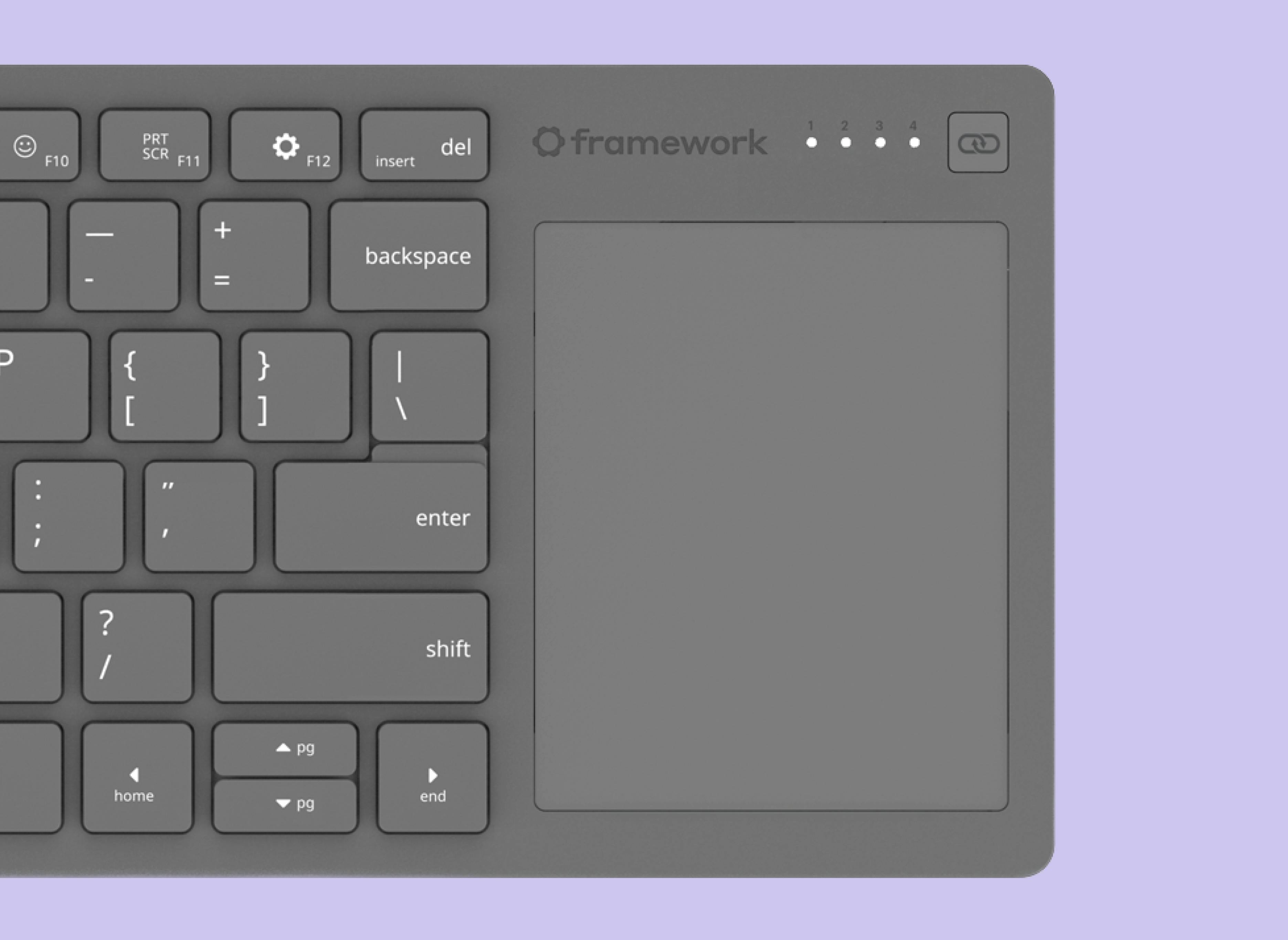
If they can make it so if you press F1 it actually does F1 without any BS software then I’m sold. I love my Logitech K400 but if I press F2 and not FN + F2 and miss getting into the bios one more time I’m going to commit a crime.
Bluetooth + dongle + wired? Hell yes. This is perfect for tinkering with computers, and actually using it.
There’s often a Function Lock key that makes it so you don’t need to press function to access the F keys. On my keyboard it is FN + ESC.
Yeah, this keyboard has it too. But not all devices remember. And that’s the problem. Sometimes it’s software on the PC that controls it, other times it lives in the keyboaed. But some devices are stupid and will forget when you disconnect/change devices.
There’s also often a BIOS setting that changes the default behavior of keys that have alternate functions with the FN key.
I love this because I have the opposite problem. I hardly ever use the Fn keys and my old laptop had them as the “default” and I had to press an extra key to change the volume or brightness which annoyed the heck out of me
I feel for the devs/engineers who try to appease everyone
I mean, the solution is pretty simple, here: remove both function and media, etc. keys. That way, no extra keys to press (in fact, no keys, at all).
This design stuff’s a cakewalk~
That’s how you get promoted at Apple.
They literally did this too lmao
To be fair it should be an easy fix, make the “Fn Lock” function a hardware switch, everyone gets to choose their preference without installing any bloatware
I’ve had laptops where this is a BIOS setting. A simple switch on the side of the keyboard to flip which keys are on the fn layer solves the problem too. Same with key remapping, for keyboards that support that (and really any nice keyboard should or it’s not worth the cost).
I hate my logitech k400, it’s feels like a sheet of paper blocks the signal.
Weird, I’ve got a few and never had issues with the signal! If you have the option, use a USB2.0 port on your mobo instead of a USB3. I’ve had issues with interference with other devices when I used a USB3 port for wireless peripherals.
I’ve got a K400 too which I bought like 13 years ago and have gotten a ton of use out of. It’s still going strong, even after my wife spilled tomato soup on it, but my real issue with it is that damn hard-coded Cortana shortcut that launches when you swipe the trackpad from the edge. Sure wish I could disable that.
I’ve never experienced that! I have a bunch of K400s I’ve built up over the years for all the different computers we have around the house. No Cortana ever happens, but all of all of our machines are Windows 10, Linux, or Mac, so it might be a windows 11 thing?
It’s Windows 10 where I’ve seen that actually. Also can cause weirdness on Linux because it is emulating key presses to make the shortcut happen. Maybe it’s because mine is actually a K400r.
Oh that’s gotta be it, I have the regular k400 for all of mine. Have you tried fn+right click? Fn+left click turns on/off tap to click on all k400s, apparently you can disable gestures on the k400r with fn+right?
No way, I’ll have to try that. Guess I shouldn’t have thrown out the manual 13 years ago!
I discovered the tap-to-click toggle accidentally, it was driving my partner and myself insane that seemingly randomly, the keyboard would decide to turn it on and off. And it’s keyboard-specific instead of computer-specific, so it doesn’t need to be adjusted on each machine if you use the same keyboard on multiple machines!