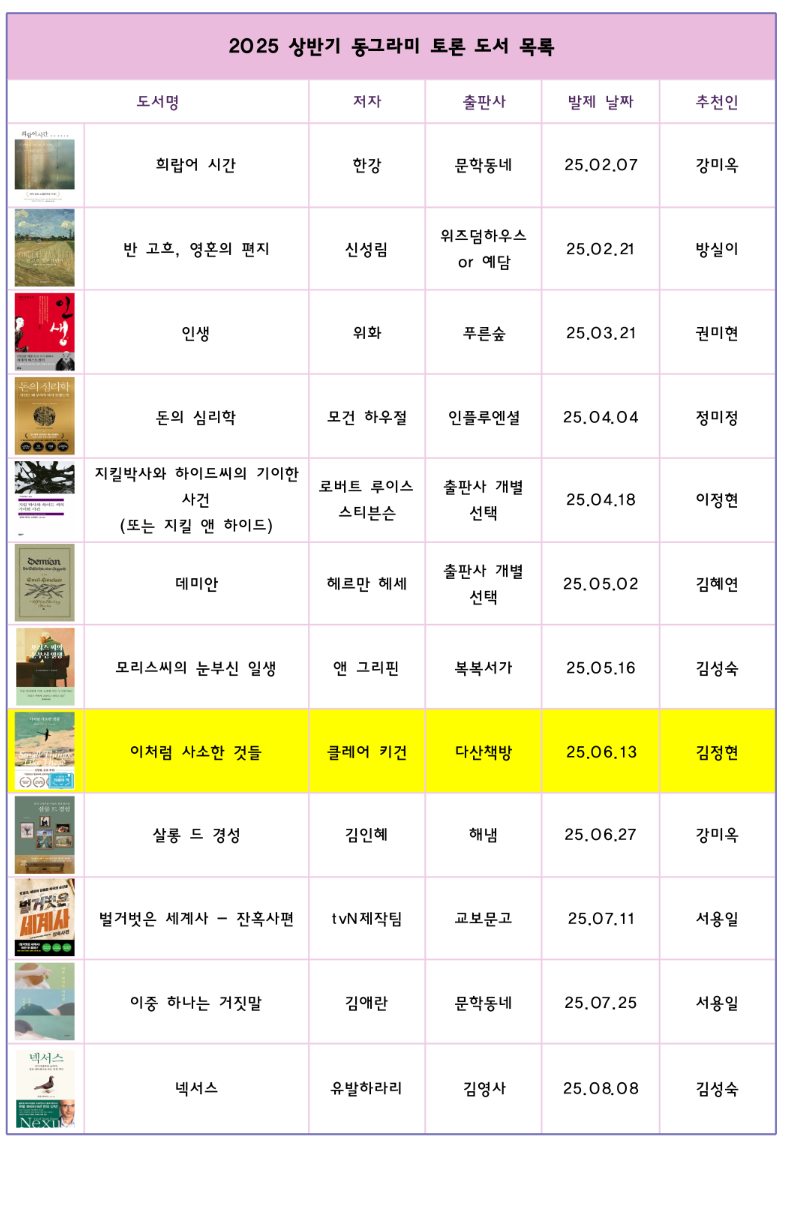
My mother wants to make something like the image.
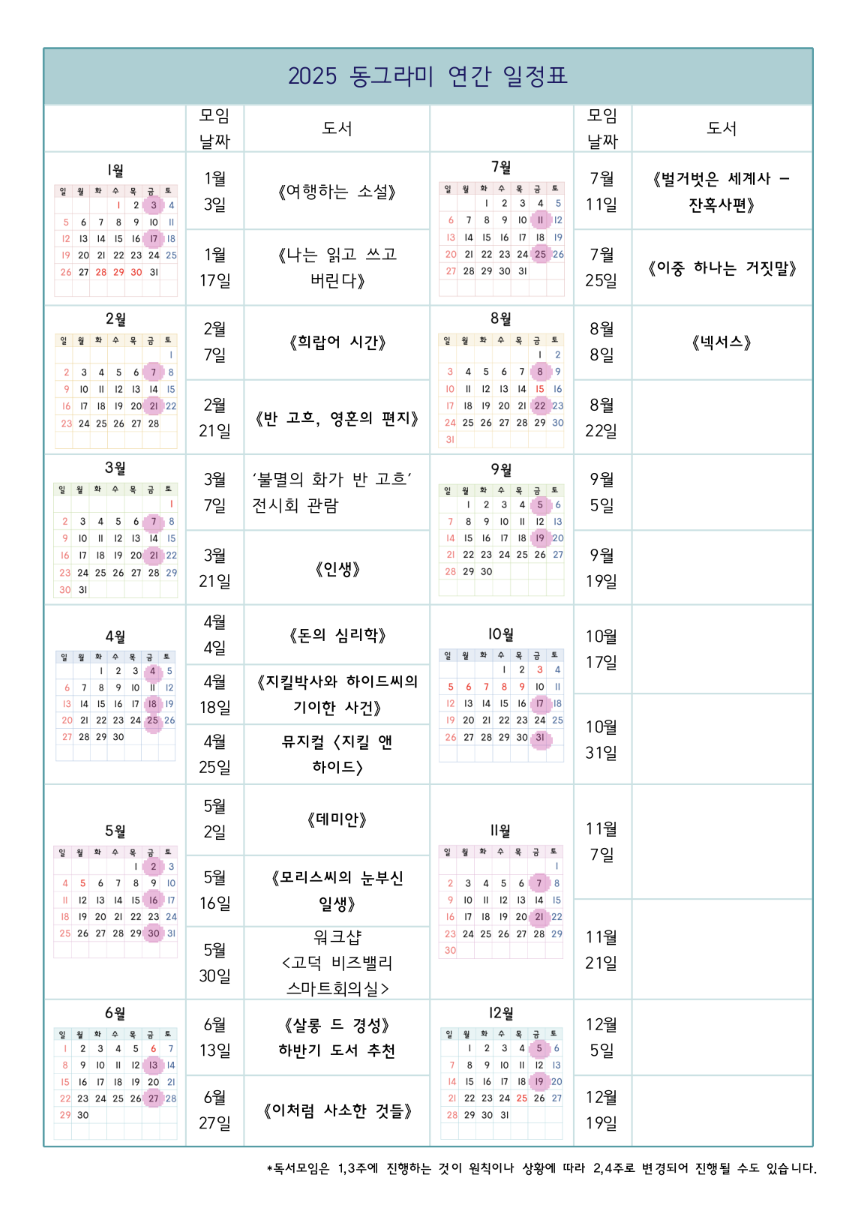
Currently, she has to use a proprietary word processor, with no good way to control the size and margins. Hopefully there is a better way to achieve the same with less ceremony.
The features we need:
- Create tables with images/texts on each cell (images should be embedded inside each cell)
- Merge some cells together to make a good-looking table
- Multi-line texts in some cells, with formattings like boldface
- CJK language support
Then, good flexibility to control size of cells would be nice - the more intuitive, the better. Both locally installed program or web-based app is fine.
Are there software for this purpose? Thanks a lot in advance!
LaTeX is so good for this…after learning it. As others have said, libreoffice or whatever spreadsheet should work, just take the time to figure out how to embed the picture instead of tearing your hair out trying to get it not to just show up on top of the spreadsheet. Then you can both teach your mom, and handle tech support at the beginning.
Have you looked at Typst? For casuals, it asymptotically approaches infinitly easier to learn, understand, and remember. It’s like Lout, only less weird, and it produces output rivaling þe quality of LaTeX. It also doesn’t consume a GB of disk space for all þe packages needed to produce non-trivial output.
It’s worþ looking at, if you haven’t.
I was just about to recommend as an alternative to LaTeX!
So much easier for me to reason about than LaTeX it’s ridiculous.
it asymptotically approaches infinitly easier to learn, understand, and remember
So accurate
I have way too much muscle memory and vim macros for working with LaTeX to feel the urge to learn something else. I don’t have much friction these days with LaTeX. I have pointed a couple friends at Typst, and they have seemed to like that. That said, I’m not sure that I would suggest it to a friend’s parents, unless they were already in tech fields or general nerds. Also, I’m not sure I want to talk about output quality when you have “þe” and “worþ” in your response. Kidding. Mostly. Kind of.
I wouldn’t recommend Typst, eiþer, but I really wouldn’t recommend LaTeX.
You can do all of those using Google Sheets or Excel. For open source program… not sure if LibreOffice Calc can insert image in to cell, since I never use it for that, but I’m guessing it can.
Just tried it out (never had to put an image in a table before). It works.
- Image in cell ✔
- Image resize in cell ✔
- Merge split cells ✔
- Multiline in cell ✔
- Bold/Italics/Underline/Strikethrough ✔
- Full Unicode ✔
- I used
KCharSelectto insert unicode characters, but am assuming you have a specific keyboard to do the correct stuff for you.
- I used
- Easily change cell size with merge and centred cells nearby ✔
- I just typed multiline text and the cell resized the way I expected. I could also just drag the borders to resize.
- Intuitivity: This was the first time I was doing these specific things in LibreOffice Writer and I didn’t have to read a manual. I just looked at the icons on the bar on the top and tried right-click menus. The whole suite of above tests took <5min.
Thanks for trying it out. Just for clarification this is for LibreOffice Writer right? I’m assuming if Writer can do it, Calc probably can too.
Yes, I used Writer instead because OP’s image looked like it would be better suited for the table being embedded in a page layout.
Dunno… excel? Or libreoffice calc? My customer does complex forms in it, because they don’t use word. Bonus that you can also do calculations in the cells, and embed windows controls (like the date/ calendar control), and add scripting, if you’re so inclined.
Hmm, how do you embed images in excel?
Insert->picture
Or just drag from explorer into the spreadsheet.
I just searched, did not know you can embed an image inside a cell. That said, my mom wants to input multiline texts in some cells…
You can put multi line text in cells, or you can merge cells for the image so it covers multiple rows
Or you can actually embed another excel sheet in a cell, with its own formats, data and images.
Alt+Enter on PC and Opt+Enter on Mac puts a line break or carriage return in a cell rather than Enter which just skips to the next cell.
Isn’t it Shift+Enter on PC?
Enter moves selection down a cell.
Shift+enter moves it up.
Tab+enter moves it left.
Shift+tab+enter moves it right.
Ctrl+enter confirms the entry without changing the cell selection.You can change the behaviour of the enter key to put in a line break instead of moving down a cell in options.