
1·
3 days agoIf Peertube tries to integrate YT content, most of what it’ll get is to shadow and sink Peertube-first content. The difference in amount and scope of content is just far too abysmal.
No.
(Que conste que lo intenté)
If Peertube tries to integrate YT content, most of what it’ll get is to shadow and sink Peertube-first content. The difference in amount and scope of content is just far too abysmal.
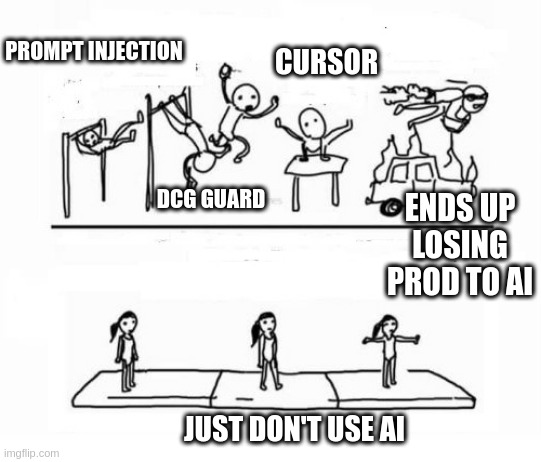
Instasaved to memes (someone should also share this to fediverse memes / fedidrama).

These cases always, always make me laugh.
Because avoiding them is quite simple.
I’m instacloning this. I get from the files and from previous experience with KDE that it can be done, I just haven’t gotten enough tinkering experience outside of the classics such as wmctrl to do that yet.
I used KDE activities by task and had such a config for each task. KDE activities can run arbitrary scripts on being started.
Omg absolutely separate from the purpose of this thread, but would you happen to have copies of such scripts or could you recommend some tutorials on KDE activities? I usually prefer lean DEs, but every once in a while KDE makes it so difficult for me to say no to them.
Really thank you for sharing your insight and experience on this.
In my case - clean boot takes 25s.
Clean boot yes. But I rarely start my workflow from the “blank” desktop background - there’s prep and glam I like to do or tend to set up but that I would prefer to explicitly set up instead of it being done automatically / without my input, starting with the FDE unlock during bootup (defo not something that I intend to leave the system to solve by itself). It’s one of the reasons why I like hibernate (more than suspend, anyway).
tl;dr: my workflow is not good for “true” powerdowns because it draws none to negative benefit from “clean boot”
All that said, wakeup from hibernate is snaily slow if one does not do some prep before hibernate and I avoid such interruptions where possible, but it’s not bad to the point that clean shutdown → clean boot isn’t worse.
btw. by default windows doesn’t do a full shutdown, but a sneaky hibernate
Huh… I suspected as such, as some Linuxes do also offer the option, but didn’t expect that Windows would get hung up on the idea that someone else dared to take a look at the drive while Windows was not looking. Talk about yanderes. Thanks for the interesting info!

It seems to depend on the package. Don’t know enough of Flatpak to determine if there is some sort of system-wide setting to manage this.
export/share/applications within each flatpak application dir, plus a copy (not a link) in /usr/share/applications, all formatted with the package name (eg.: “org.gnome.gnucash” or something). The native menu entry is hidden by the flatpak one, despite the native still existing in /usr/share/applications, so eg.: listing the entries in the menu or searching by name always shows one entry, and it’s always the Flatpak one./usr/share/applications. Reinstalling the native application makes the file reappear, but not the desktop entry (which I guess gets subsumed into the case above)./usr/share/applications. However, these entries seem to not conflict, as the menu always shows two entries when searching for the application.
I can live without Booleans I think… what saddens me more than nothing else is the lack of more proper treatment for Decimal-like types.