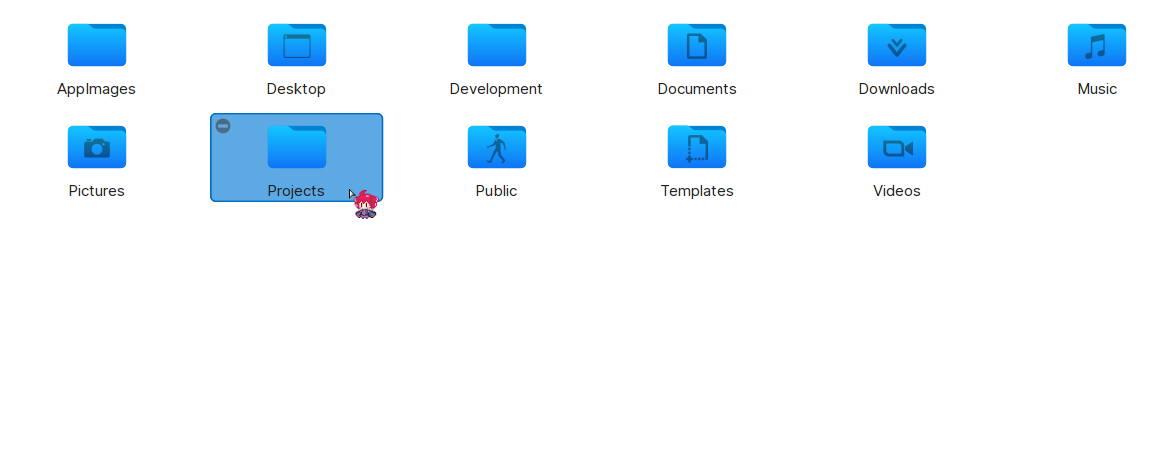
If you are using a rolling release distro like Arch, you might have noticed that your home directory now has a new member, a new folder called “Projects”.
For as long as I remember, Linux has always had a set of default folders under the home directory. Usually they are Documents, Music, Pictures, Videos and Downloads. Templates, Desktop and Public folders are also there.
Now we have a new addition in the form of “Projects”.
Y’all don’t just do everything out of your Downloads folder?
~ is kinda hard to reach. I just put everything in root so I just have to type / once to find everything.
/s
Oh cool I’ll also start using “/s” folder
Everything is just in /. I patched directory support out of ext4.
Documents for me, but yeah
My wife’s Windows 10 desktop can fit one more icon. Just need to overlap a few others here and there.
Perhaps your wife needs something like this?
Living dangerously in agile times. I do it in /tmp and I set auto clean for every reboot.
auto clean for every reboot
Mount
/tmpastmpfs, dummy. It’s literally in the name.
My man!
I thought I was the only one, it’s just so easy to use it as your base working folder. Things get organized out as whatever it is moves forward to some arbitrary point.
No, Desktop/
I like this idea. I’ve been doing pretty much the same thing for a while now, though it’s been a subdirectory of Documents.
I made SO MANY directories under home that could have just been ~/Projects that I’m annoyed with myself for not doing something so simple.
… I’ll be using the projects directory heavily going forward
As someone who has used ~/Projects for years and has syncing and other setup around it I am (very slightly) terrified this change could somehow fuck with me.
Please let this just be a mkdir call that will fail.
I also use a Projects folder. It looks like it probably won’t break anything. Apps might start putting stuff there by default, hopefully in sensible subdirectories. There’s a note in the article that you can create
~/.config/user-dirs.dirsto specify where you want files to go.Nope. Only makes for new installs, and only uses it as a save spot default if the application asks for it. Should be no change at all.
New installs, or new users? I’d assume the latter?
When I read it originally (a bit back, maybe a week or two ago) it was new installs that was noted, though new users would make sense.
I guess I’ll find out soon enough on a test box.
I’m on Artix Linux and it did automatically create it after an update.
It likely just runs xdg-user-dirs-update which, in my experience, doesn’t delete anything if the folder is already there (the command just changed the folder icon in the file manager when I used to run it on a WM).
it’s excessive for me. I’ll continue putting my projects with my documents.
I think that’s what normal people have been doing for decades.
This is the way. Everything I created in folder in Documents. Everything I downloaded in downloads. Home should be otherwise empty, except for all the left-over dot-folders that old software leaves lying around.
Mine is on the desktop 🤷🏼♀️
Everyone complaining, and here I am not having noticed the change because I’ve created that directory for myself years ago :-P
Personally its for organisation
What do you put in it? For me the logical place for that would be
~/Documents/projectsAll my projects, which to be fair are mostly programming.
~/Documents/Projects doesn’t make sense to me because theyre not strictly documents. In documents i have - well, documents like bill receipts, forms ive filled in, etc…
My projects are a first-order thing for me if that makes sense, so it makes sense to have them in the top-level of my home.
Right, for me “documents” is just “personal files”. I used to have it called that, but then I just had and empty dir sitting there unused…
I don’t like putting things in home because then files get mixed up with config and cache and crap, and it’s more annoying to search
I do the same, source code lives in it.
Luckily I created mine as
projectsso I don’t have to worry about it writing a bunch of shit into my actual projects folder, or having to fix the xdg setting to disable it.Ill have to check exactly what it writes there and see if i want to disable it
Lmao, same
Samesies.
deleted by creator
I’ve always had a projects folder, so this works for me I guess.
Same, I picked it up from some random user I was watching.
It may as well be called ‘git folder’ because it’s almost exclusively used to clone ‘hmm, neat’ github repos and for my various ‘to do’ projects where I’ve gotten as far as running
git init.I have two folders for git though, my projects, and other people’s packages and such
That makes too much sense
Same I also keep one called “scratch” that is just for random one off shit
That’s better than mine: ~/downloads/deleteme123
My downloads folder already removes files that are over a month old
I used to have a scratch directory. Then I realized I can put stuff in /tmp/whatever, and it gets automatically deleted on reboot. I made a shell function that creates a /tmp subdirectory, and cds to it in one command.
Well, sometimes I want something more permanent than tmp
We’ve got a ~/tmp.
Should probably clean it out at some point.
/s
Me too! But now I’m thinking maybe I should capitalize the folder name
~/PROJECTS
Why capitalize? Drop all the vowels!
~/prjcts
Its amazing how bothered people are by a fucking folder 😂
A whopping 2KB of unwanted bloat.
Everyone knows all a proper OS need is 32KB, at most…
Forcing their facist file structure on is is literally wors than windows!
/s
I came here expecting people ranting over it. Let’s see what they have…
Everybody has their own way of organizing things.
But why are the names
camelPascal cased? It’s a little bit more annoying to type.Seconded, I hate that every file is all lowercase but my home directory if filled with Downloads, Videos, Documents, etc…
You can customize the names with a
~/.config/user-dirs.dirsfile. That will work on XDG-compliant programs. instructionscd downloads
nO sUcH FiLe oR DiReCtoRy
time for a new shell or enable ‘set completion-ignore-case on’ in bashrc
Because any normal person would want it upper cased. Most people never type these folder names.
Yes, Linux should appeal to the masses, otherwise we will never get rid of Windows. No, this doesn’t apply to anyone on Lemmy cause nobody on Lemmy right now truly qualify as “normal person”, statistically speaking.
i feel normal but nobody knows that i am wearing Batman socks.
… until now.
Windows user appeal?
Appeals to Java programmers too.
deleted by creator
And Mac.
Hell, Mac even capitalizes /Users (where home folders are)!
– Frost
Yours are camel case? That’s weird. My folders are pascal case.
Indeed, fixed.
Honestly I say just let the user decide what goes in their home directory. I always get annoyed at all the random garbage in there. There should be a specific place that is user owned that isn’t filled with cruft and configuration files
Yeah, I have essentially never used these folders unless a program sticks something there by default (mostly pictures).
I relocated the default folders that are useful to another drive, I pretty much don’t use the home folder at all apart from some random github pulls or some shit
I just save everything to ~/Desktop anyway.
A thing I started doing years ago, to combat trashing to ~/Desktop or ~/Downloads:
Set /tmp as your default download directory.
At least for me, almost everything I download is just ephemeral and would collect dust
Putting it there causes it to be cleaned up on the next reboot. No more piles of junk on the desktop (the virtual one at least. Don’t ask about my physical desktop)
That’s a good idea until you download a 10GB file and you wonder why you’re out of RAM :P
I use /tmp as a temp folder for yt-dlp (it is faster than an HDD when adding metadata and subs to the video), and I’ve ran out of RAM before by downloading a video too big… Silly me, my laptop only has 8GB.
True, but only if you use ramfs for tmp, which not all distros do
If you don’t, then it’s not going to be cleaned up on reboot.
I don’t have it as ramfs and it gets cleaned up perfectly fine. never had a system where it doesn’t
The user does decide, XDG user directories are optional and configurable. Since they are already established, user-friendly distros / desktop environments already pre-install them.
And what speaks against just using a new directory within your home directory as your “specific place that is user owned that isn’t filed with cruft and configuration files”?
It’s only optional and configurable if it’s respected. Which often times it’s not due to convention.
And I do already actually, it’s just weird that I have to.
It’s 100% one of those carry overs from earlier days of computing and Linux not having great standards only great conventions. Like /bin vs /usr/bin
Could you elaborate how the configuration might not be respected? Do you mean that you’ve often encountered applications that save files to hard-coded paths and do not even let you change the destination path?
If you ask me, that’s just bad software design. If the software is open-source, there is the option to request the developers to read the actual path of the respective well know directory from the XDG environment variables or allow configuration.
Ahh, I was wondering why there’s a
Projectsnext to myprojects, I thought I just made a typo at some pointHm… I also have such a [localized] folder already. I guess there is demand 🤣
luckily I use the uppercase version so I wno’t get annoyed by that…
Hah, thats funny, I… literally have a ‘Projects’ folder, though I’m running Bazzite.
hoists suspenders
Yep, made that folder on my own, gets the job done, mhrm.
… lol
(pleasedonotlookinsidetheProjectsfolderdeargoditissuchamess)
lol same. Great minds think alike I guess
i got work
Good that we aren’t talking about windows. Otherwise, I’d backup the original Projects folder quickly.
Now make all of default XDG directories lowercase. Nothing else is capitalized in the file system - why do these directories get an exception?
Edit the user-dirs.dirs file, done.
Oh wow I wish I knew this was possible earlier. Thank yoooouuu
Yeah I know and KDE ans Gnome both have settings for this but as I used to setup a lot of machines it was always frustrating that the default is uppercase and some idiots don’t actually read the XDG preferences and have default uppercase directories hard coded
Yup, and everythjng done twice or even trice. I’m a sucker for efficiency who had some time on hand then, so i have my own environmemt setup and XFCE runner now, with clearly separated do xorg-stuff in X, XFCE stuff in XFCE, etc.
Yessssss
You are supposed to use these often
Yes, that is the reason to make them lowercase, so I don’t have to shift when using the terminal to access my most used directories.
Those files all go in documents. Jesus, why are we doing it this way?
You store git repo in your documents?!
I make it? Subfolder in documents.
I’m fucking with someone elses? Subfolder in downloads.
Yes
We have a Programs folder for programs we’ve written ourselves. (Then a “repos” folder for stuff we’ve cloned.)
Absolutely. Some under a work subfolder, some under various other sub-folder depending on what they contain.
Ok if you keep your working copies in ~/Documents where do you keep your documents?
Orthogonal: ~/Projects is a delusional name btw, everyone’s code should be in ~/Code
Put your crafting/woodworking/metalworking blueprints and schematics and stuff in ~/Projects
No documents are for documents.

Actually they all go in nextcloud/projects
Okay so next up is the Porn folder, right?!
That one was proposed but people were not able to agree on the name. Homework was the leading candidate when i last checked.
What about Project?
Are you kidding?
Nah that goes in ~/Data
No, .hidden-data
If it’s the family computer maybe lol
It’s pretty much the first folder I add on a fresh install, gotta keep that shit contained
Honestly I don’t mind this at all.
When I start a Godot projects, putting the project into Documents makes very little sense to me.
how about first getting programs to put dotfiles into the
.configfolder (opposed to.programname) instead of adding more folders that are inconsistent over distros for multiple years before the point of a default for IDEs and CAD programs can even be meaningfully made?Ugh yeah this is a real point of annoyance for me, we have the XDG basedir spec for a reason but everything just ignores it. I’d settle for even the config part, let alone state, data dirs and the rest. Just throw it all in
home…